Launch your full workspace in < 3s
Ikuna saves each setup and restores it in one click.
Different role, different apps, different tabs, different layouts.
Waste no time organizing. We do It for you.
Start Free - Built by Brainsoft in EU
SAVE AND LAUNCH
Create an Ikuna
Waste no time opening and arranging.
Ikuna snapshots every open app, browser tab, and window position across all your monitors. One click.


LIGHTNING FAST
Your whole setup, live in under 3 seconds"
Shortcut, click, done.
Eliminate the startup friction. Watch the cognitive clutter snap instantly into a focused workspace.
MULTI DISPLAY SUPPORT
Works across every screen you have
Saves the location of your open apps across multiple screens.
Remembers window positions across multiple monitors. Plug in, and it's already set up.


VIDEO AND AUDIO TRIGGERS
Get in the right mindset.
Use visual cues to prepare for what’s next.
Add a playlist, a video, or a wallpaper to each workspace build a ritual that signals your brain to focus.
CUSTOMIZABLE
Easy customization
Make each space unique with an advanced setup
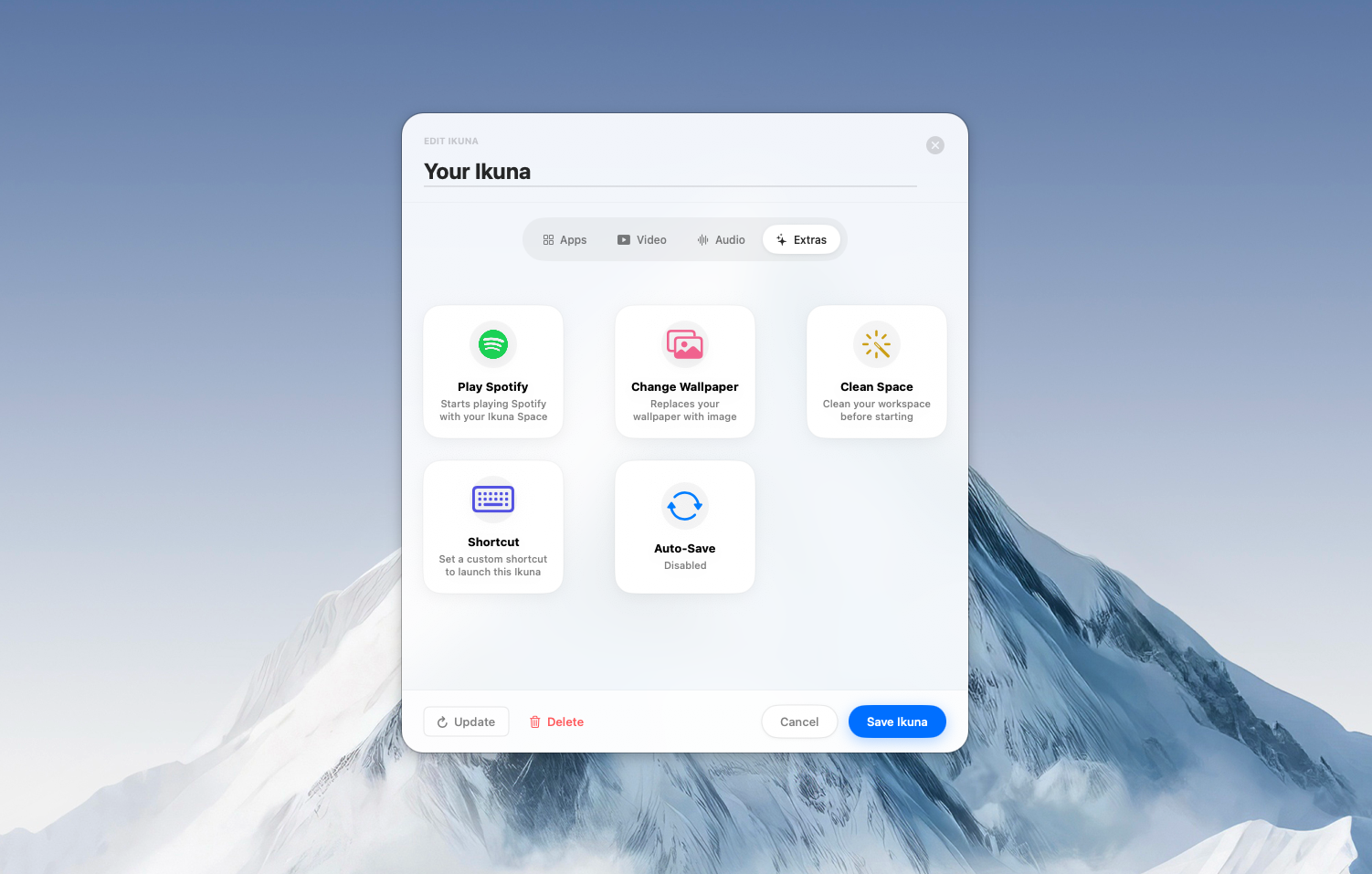
Edit apps in your workspace, add a video or audio trigger, change your wallpaper or start Spotify.
PRO ANALYTICS
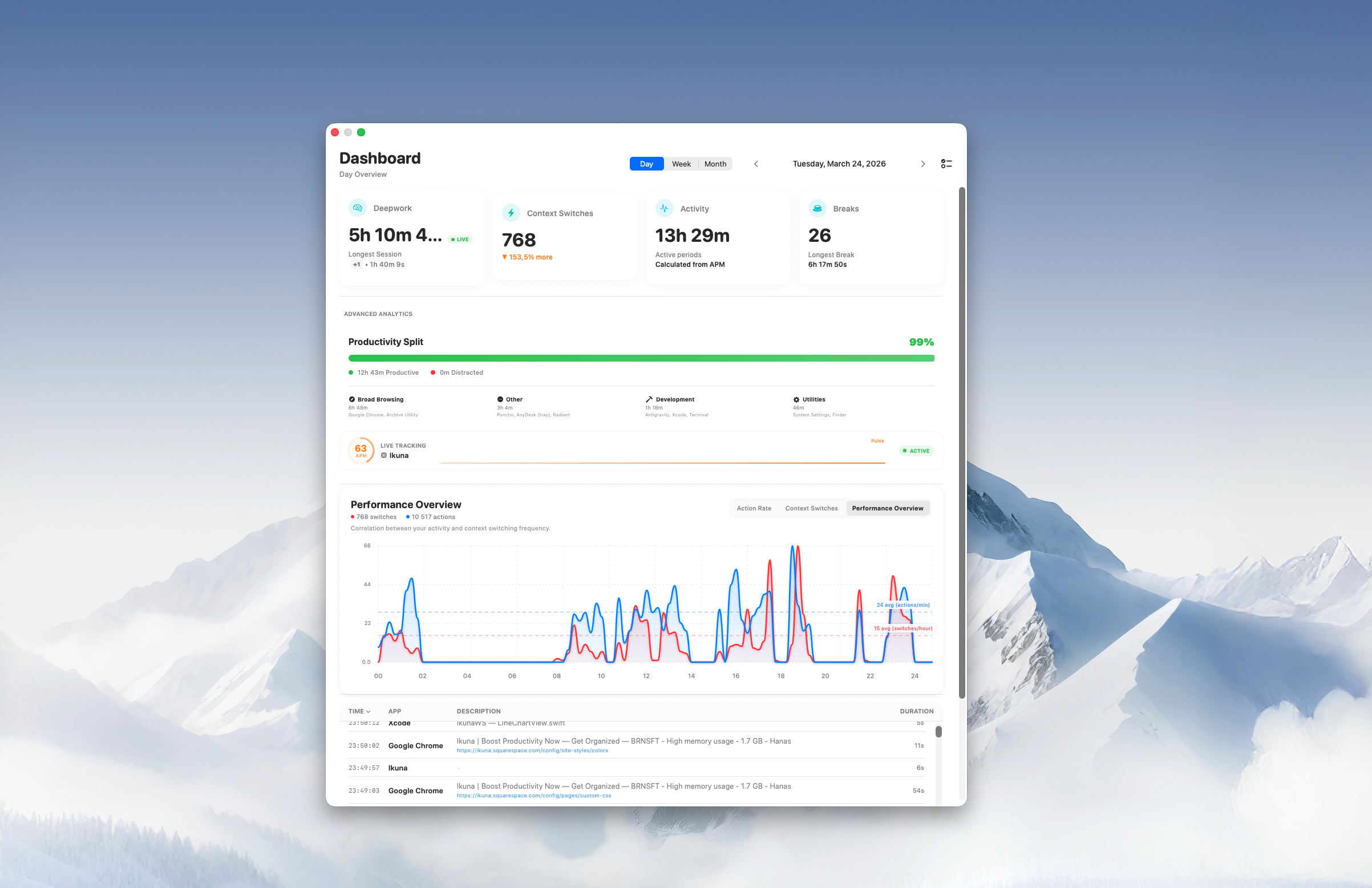
Dashboard with metrics
Do you know how many times you context switch?
Ikuna helps you understand your working habits better.

Your client work feels different from your writing. Your workspace should too.
Each Ikuna space carries its own wallpaper, playlist, and launch video. Switching context stops feeling mechanical and starts feeling deliberate.
Build your first space01
Client work
A brighter, higher-energy wallpaper for delivery work so the space feels active before the apps even open.
02
Deep writing
A cooler, quieter wallpaper for writing mode. Less visual noise, softer energy, and a calmer starting point.
03
Morning review
A lighter review space for planning and triage. The wallpaper opens the day with a more spacious tone.
The idea
behind it
You unconsciously shift gears when you switch projects. The music changes, the pace changes, even your posture changes. Ikuna makes your Mac catch up to what your brain already knows.
Start free.
Go deeper when ready.
The core product is free forever. No card, no time limit. Pro adds the power layer.
Free plan
€0
forever
No card required
- Up to 4 Ikunas
- Save and restore all apps and tabs
- Multi-monitor support
- Video and audio triggers
- Keyboard shortcuts
- Basic activity dashboard
Pro plan
€9
per month
- Everything in Free
- Unlimited Ikunas
- Device Link · auto-launch on monitor connect
- Focus Shield · distraction blocking per workspace
- Advanced dashboards
- Priority support
The science behind it
Context switching
is costing you
more than time.
to regain deep focus after a single context switch
Gloria Mark, UC Irvine — and for most people, the next switch arrives before recovery is complete.
Focus is fragile
Every time you switch projects — even to check a single tab — your brain drops its working memory load. Rebuilding that mental model takes real time, not just seconds.
For most people, recovery never fully completes before the next switch arrives.
Environment shapes thought
You unconsciously shift gears when you change projects. The music changes, the pace changes, even your posture changes. Your Mac doesn't know that yet — so you spend mental energy telling it.
Ikuna makes your Mac catch up to what your brain already knows.
Clutter has a cost
Scattered tabs, wrong windows, apps from the last project still open — every piece of screen clutter is a micro-decision your brain has to make. Dozens of those per switch add up fast.
One click clears the previous context. You start clean, not mid-mess.
Built natively for macOS
For speed & power ⚡
If your Mac can run macOS 13, you won’t have any problems running Ikuna.
GET STARTED
Stop rebuilding
Start working
Download free. Your first workspace takes 2 minutes to set up.
Free Forever - Built by Brainsoft in EU
FAQ
-
Think of Ikunas as shortcuts to your projects. Once you click them, they open all the apps/ websites you had saved.
An Ikuna is a saved snapshot of your entire working environment for one project: apps, tabs, window positions, triggers. Ikuna works on top of your existing setup.
-
Ikuna uses macOS Accessibility APIs to see which apps are open and where their windows are positioned. Without this, it can't save or restore your workspace. We don't track what apps you use or send that data anywhere.
-
[Clean] minimises all open apps to the Dock with one click, giving you an instant, clear desktop.
Use it before launching a new workspace so you start fresh without distractions from the previous context.
[Clean] can also be made to close all windows before another Ikuna is started. -
IKUNA comes from the Finnish word: “Ikkuna” which means window.
We liked the analogy. -
Ikuna runs on macOS 13 and above, It's built natively for Apple Silicon and Intel Macs.
-
Yes. The Free plan is a permanent tier, not a trial. Your 4 Ikunas won't disappear and we won't ask you to upgrade to keep using them. Pro adds features on top, it doesn't take anything away.
-
Most Ikuna users already have a window manager and use both
Those tools manage window layout, they resize and snap windows into grid positions. Ikuna manages entire project contexts. It saves which apps are open, which tabs, and where every window is across all your monitors; then restores the whole thing at once. Different job entirely.